The popular Warcraft 3 map FUFU NINJA is now available in DOTA 2!
In FUFU NINJA, you select one of the 4 ninjas (Panda Ninja / Vampire Ninja / Hunter Ninja / Tree Tag Ninja) and your goal is to become the first ninja to get 50 kills.
Check the FUFU NINJA trailer:
Download on the Steam Workshop:
Showing posts with label Dota 2 Custom Maps. Show all posts
Saturday, September 26, 2020
Thursday, September 3, 2020
Aghanim's Tree Tag Prison Break - Dota 2 Custom Game
Do you remember the Tree Tag games from Warcraft 3?
Aghanim's Tree Tag Prison Break is inspired by those maps.
In this game, you are either an ENT or a DOOM GUARD.
Ents have to survive for 10 minutes while Doom Guards need to hunt the ents.
Check out this SFM trailer:
Download on the Steam Workshop:
Aghanim's Tree Tag Prison Break
Aghanim's Tree Tag Prison Break is inspired by those maps.
In this game, you are either an ENT or a DOOM GUARD.
Ents have to survive for 10 minutes while Doom Guards need to hunt the ents.
Check out this SFM trailer:
Download on the Steam Workshop:
Aghanim's Tree Tag Prison Break
Labels:
Dota 2 Custom Maps
Saturday, February 20, 2016
Element TD now in Dota 2
Dota 2 Element TD
From the Warcraft 3 Element TD development team comes forth Element TD in Dota 2.
The Dota 2 version of Eletd tries to stay true to the original and it has not failed.
ElementTD 's release on the Dota 2 engine is a sign that more WC3 favorites are being ported.
To start playing, just click ARCADE inside DOTA 2 and look more Element TD.
Element TD team on DOTA 2:
- Evan Hatampour
- Martin Noya
- Stuart Hwang
- Anthony Guerrera
- Vlad Marica
Check the game out!
From the Warcraft 3 Element TD development team comes forth Element TD in Dota 2.

The Dota 2 version of Eletd tries to stay true to the original and it has not failed.
ElementTD 's release on the Dota 2 engine is a sign that more WC3 favorites are being ported.
To start playing, just click ARCADE inside DOTA 2 and look more Element TD.
Element TD team on DOTA 2:
- Evan Hatampour
- Martin Noya
- Stuart Hwang
- Anthony Guerrera
- Vlad Marica
Check the game out!
Labels:
Dota 2,
Dota 2 Custom Maps
Thursday, October 29, 2015
Dota 2 Haunted Colosseum
Haunted Colosseum - Dota 2
With the popularity of League of Legends' Dominion mode and Heroes Of The Storm, Dota 2 has decided to release the best capture point mode in MOBAs with the Haunted Colosseum custom mode.
Played by millions of players worldwide, Dota 2's Haunted Colosseum is a mode where 2 teams battle it out to capture 5 Control Points located throughout the arena.
Dota 2 Haunted Colosseum mode
For Dota 2 updates:
Dota 2 updates on Twitter
Dota 2 updates on Facebook
With the popularity of League of Legends' Dominion mode and Heroes Of The Storm, Dota 2 has decided to release the best capture point mode in MOBAs with the Haunted Colosseum custom mode.
Played by millions of players worldwide, Dota 2's Haunted Colosseum is a mode where 2 teams battle it out to capture 5 Control Points located throughout the arena.

Dota 2 Haunted Colosseum mode
For Dota 2 updates:
Dota 2 updates on Twitter
Dota 2 updates on Facebook
Labels:
Dota 2,
Dota 2 Custom Maps
Friday, July 3, 2015
Dota 2 Custom Maps
Dota 2 Custom Maps
Custom maps is one of the reasons why Warcraft 3 became one of the most played games of all time.
With the introduction of a hugely improved interface for custom maps in the Dota 2 Reborn update, Dota 2 aims to replicate Warcraft 3's massive appeal to the casual crowd while avoiding the mistakes of Starcraft 2's failure.
Dota 2 Custom Maps Introduction by Valve:
Some of our favorite custom maps from Warcraft III:
1. Fufu Ninja
(Fufu United Ninja All-Stars)
- This Warcraft 3 custom map featured 4 different types of assassins in a free for all mayhem.
2. Elimination Tournament
- This Capture The Flag rewarded skill shots and quick thinking.
3. Tree Tag
- Warcraft 3 was full of maphacks but Dota 2 can bring back that suspense of hiding from The Infernals.
4. Dodge Ball 1.0
- This classic by MaD[Lion] is definitely a party favorite.
5. Uther Party
- Mini-games galore - perfect for LAN parties
Which Dota 2 custom map do you enjoy playing?
Custom maps is one of the reasons why Warcraft 3 became one of the most played games of all time.
With the introduction of a hugely improved interface for custom maps in the Dota 2 Reborn update, Dota 2 aims to replicate Warcraft 3's massive appeal to the casual crowd while avoiding the mistakes of Starcraft 2's failure.

Dota 2 Custom Maps Introduction by Valve:
Some of our favorite custom maps from Warcraft III:
1. Fufu Ninja
(Fufu United Ninja All-Stars)
- This Warcraft 3 custom map featured 4 different types of assassins in a free for all mayhem.
2. Elimination Tournament
- This Capture The Flag rewarded skill shots and quick thinking.
3. Tree Tag
- Warcraft 3 was full of maphacks but Dota 2 can bring back that suspense of hiding from The Infernals.
4. Dodge Ball 1.0
- This classic by MaD[Lion] is definitely a party favorite.
5. Uther Party
- Mini-games galore - perfect for LAN parties
Which Dota 2 custom map do you enjoy playing?
Labels:
Dota 2,
Dota 2 Custom Maps
Sunday, August 10, 2014
How To Download Dota 2 Workshop Tools
How To Download Dota 2 Map Editor
Looking to create a Dota 2 custom map?
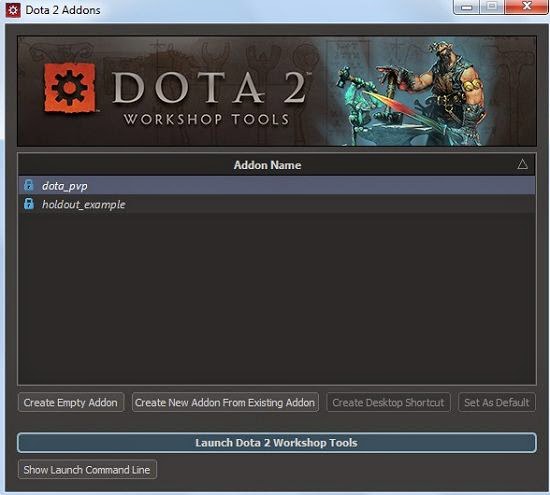
First, you must download the Dota 2 Workshop Tools Alpha.
It is the map editor used to create Dota 2 maps and mods.
(The following steps are necessary for the Alpha / Beta version)
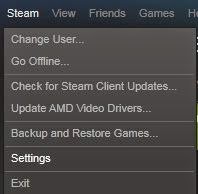
1. Inside your Steam Client, click Steam (Upper left side) and click Settings.
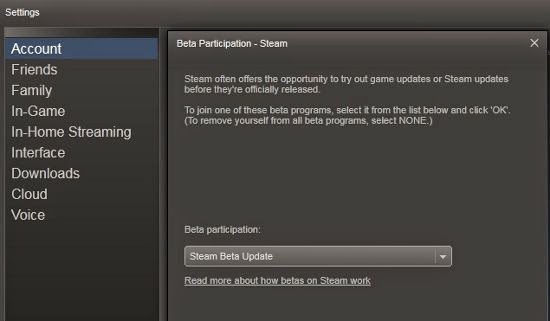
2. On the Accounts tab, select STEAM BETA UPDATE under Beta participation.
3. After your Steam client has been updated, go to your Steam Library.
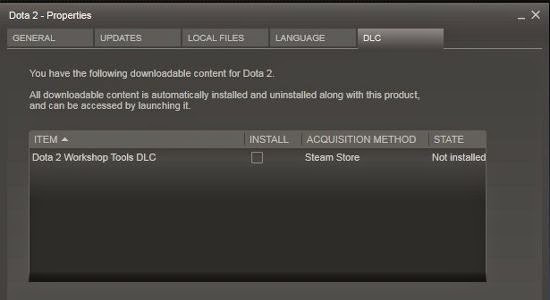
4. Right click Dota 2, click Properties and select the DLC tab
5. Check the Dota 2 Workshop Tools DLC check box to install the downloadable content.
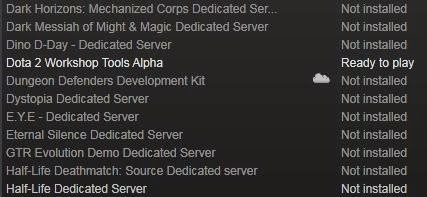
6. After the Dota 2 Tools is installed, click LIBRARY and select TOOLS.
7. Select DOTA 2 Workshop Tools to run it.
8. Congratulations! You can now launch the Dota Workshop Tools and start making maps!
For questions, you can comment below or send a tweet @neutralcreeps.
We can't wait for map makers to port all the popular Warcraft 3 custom maps!
Looking to create a Dota 2 custom map?
First, you must download the Dota 2 Workshop Tools Alpha.
It is the map editor used to create Dota 2 maps and mods.
(The following steps are necessary for the Alpha / Beta version)
1. Inside your Steam Client, click Steam (Upper left side) and click Settings.

2. On the Accounts tab, select STEAM BETA UPDATE under Beta participation.

3. After your Steam client has been updated, go to your Steam Library.
4. Right click Dota 2, click Properties and select the DLC tab

5. Check the Dota 2 Workshop Tools DLC check box to install the downloadable content.
6. After the Dota 2 Tools is installed, click LIBRARY and select TOOLS.
7. Select DOTA 2 Workshop Tools to run it.

8. Congratulations! You can now launch the Dota Workshop Tools and start making maps!

For questions, you can comment below or send a tweet @neutralcreeps.
We can't wait for map makers to port all the popular Warcraft 3 custom maps!
Labels:
Dota 2,
Dota 2 Custom Maps,
Dota Guides
Sunday, May 4, 2014
Dota 2 Pudge Wars
Pudge Wars in Dota 2
D2 Pudge Wars is a remake of the Warcraft 3 custom map.
2 teams of Pudge players are divided by a river in a race to get 50 kills.
How to play Pudge Wars:
Each player controls a Pudge that has an upgradeable Meat Hook ability. Players can upgrade the damage, radius, distance, and speed of their hooks as they level up. The first team to reach 50 kills wins.
Coming soon to DOTA 2!
Get the latest Dota 2 custom map updates:
Dota 2 custom map updates on Facebook
Dota 2 custom map updates on Twitter
2 teams of Pudge players are divided by a river in a race to get 50 kills.

Pudge Wars in the Dota 2 engine developed by Kobb and Aderum
How to play Pudge Wars:
Each player controls a Pudge that has an upgradeable Meat Hook ability. Players can upgrade the damage, radius, distance, and speed of their hooks as they level up. The first team to reach 50 kills wins.
Coming soon to DOTA 2!
Get the latest Dota 2 custom map updates:
Dota 2 custom map updates on Facebook
Dota 2 custom map updates on Twitter
Labels:
Dota 2 Custom Maps
Subscribe to:
Posts (Atom)