Showing posts with label DotA Servers. Show all posts

Tuesday, September 27, 2011

How to play DotA in Garena

Garena DotA Guide
This guide will help you play DotA games in Garena - the most popular DotA client.

Steps on how to play DotA on Garena:
1. First, you must have a Garena account.
Don't have one? Register a Garena account at www.garena.com

2. Download the Garena client.

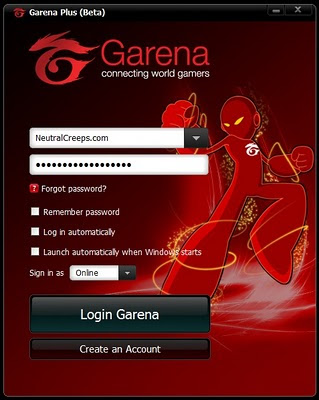
3. After installation, log in to your Garena account.


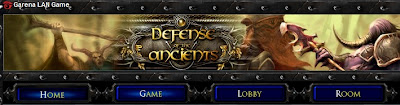
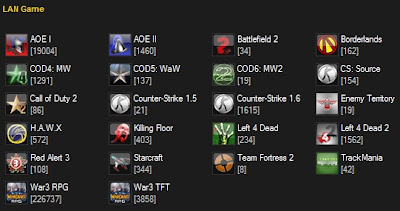
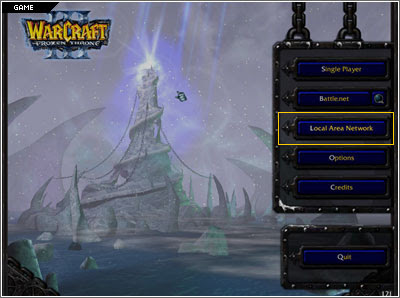
4. Click on the LAN option.


5. Click on the Game Button.
>

6. Select War3 RPG.


7. Click on a DotA room that is not full.
*Full Garena DotA rooms show as 235 / 235.

8. When you're inside the room, click on Start.

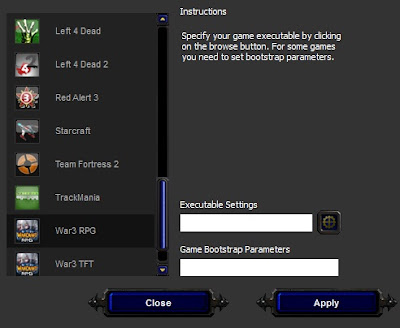
9. If you have not yet applied your settings, a settings window will pop up.


10. Enter your War3.exe location on the Executable settings.
*Click on the gear icon to facilitate searching for your Warcraft III: The Frozen Throne game file.

11. Once it has been found, click Apply. And then click Start.

12. You have now successfully opened Warcraft 3 TFT on Garena!

13. Start playing DotA like on LAN (Local Area Network).


14. Don't forget to download the latest DotA maps at www.getdota.com.

If you have any questions about setting up DotA on Garena, just post a comment below.

Monday, October 4, 2010

Garena

Garena (previously known as GG-Client) is a gaming platform for various games.
But the most prominent supported game is Warcraft III which is the engine used by DotA.
Steps on how to play DotA on Garena.
1) Register a Garena account: http://register.garena.com
2) Download the game at the Garena website: http://www.garena.com
3) Follow the steps on How to play DotA on Garena.

Garena Features:

Supports a Wide Range of Games
You can play games from Warcraft 3 DotA to FPS games and even Heroes of Newerth.

Lag-Free Experience
Garena tries to emulate LAN conditions making games seem lagless most of the time.
Even though Garena is not perfect, BattleNet pales in comparison to this gaming client.

Connect with millions of gamers around the world
Garena enjoys concurrent numbers reaching hundreds of thousands of gamers.
Adding to the social interaction are game chatrooms and clans.

Multiple Language Support
Garena supports English, Chinese, Vietnamese, Russian, Spanish, Portuguese, Thai, Korean, Japanese, Kazakh. It continues to create translated versions for various languages.

Quick questions about the Garena Product:

Is Garena superior compared to Blizzard's BattleNet?
Yes. In terms of DotA, Garena makes Activision Blizzard's BattleNet bite the dust.

Garena claims to be hack-free, is this true?
Not anymore. Over the years, multiple 3rd party programs have been created to bypass Garena's anti-hack program.

Is there a better alternative to playing DotA on Garena?
Sadly no. Other platforms like DotaPod and Darer claim to be better but overall, Garena wins by a mile. If you want to play DotA, Garena is the best possible place to hone your skills outside of competitive LAN matches.

Can I use Garena on a Mac or Linux?
There are work-arounds like running Wine (for Linux), Parallels Desktop, VMWare and Crossover (for Mac) but these methods are unreliable. Some Mac users even resort to running Boot Camp. Garena currently does not support native installations for these operating systems but you can join the Garena on Linux and Mac Petition. If enough gamers support it, the Garena developers may be compelled to start working on it.

This article was published on October 2010. It will be continually updated as Garena implements changes to their software.

We would like to thank GarenaGamer for providing this guest post.
If you want to contribute an article to Neutral Creeps, contact us here on the blog or via Twitter @neutralcreeps. We welcome contributors here at NeutralCreeps.

Wednesday, October 21, 2009

iCCup now has a DotA ladder

Looking for a new DotA server?
iCCup adds a DotA Ladder!


iCCup is an online gaming league mostly known for its popularity in Starcraft. Recently, however, iCCup has expanded its boundaries to Warcraft III.

iCCup announced yesterday that they will be adding DotA to their ladder. The season is currently in beta and is now playable.

iCCup features an anti-hack program, latency stability via complementary hostbots, and a point system based on players' wins and losses. Additionally, players from every region are allowed to participate in iCCup.

If all goes well this beta season, there is a chance that iCCup will continue its support of DotA with its first season.

So how do I play DotA on iCCup?

1. Make an account on www.iccup.com

2. Download the latest DotA map version from here
3. Simply download the Anti-hack launcher, install the launcher, and double click the shortcut on your desktop. Click the Warcraft 3: TFT icon, and press launch game.
4. Select The Abyss (iCCup) from your normal server list, and login to our server using the login name and password you chose on the iCCup website.
5.Enjoy!

How does the iCCup rating scale work?

You begin at iCCup with the ranking of “D” with 1000 points. Winning matches will improve your points rating, and losing matches will do the opposite. Every 1000 points you win, you will improve once step in rank. The ranking system goes from D-, D, D+, C-,C, etc. This is a system long implemented by the Starcraft community to create a well balanced environment for players to play in and find players of similar skill. Detailed chart can be seen here.

Is the Anti-Hack effective?

This 3rd party Anti-Hack software created by the iCCup tech crew is an extremely effective way of deterring hackers from playing on iCCup ladder. By virtually scanning your Wc3 while you play of any 3rd party hacking devices, it ensures hackers will be disconnected or rewarded no points while playing ladder games. This includes programs like Ban list, so please make sure you have these turned off before logging into iCCup, or it is likely you'll be immediately disconnected. If a hacker were to search a ladder game and win – he is rewarded no points for his victory. Also, you can report all hackers you find with attached replay on the iCCup forums!

I've been Tie-Hack/Map Hacked who do I tell?!

Please report all instances of hacking that you believe to the Hack Report section of the iCCup forums with attached replay and why you believe this player was hacking. An admin will review the case and make a judgment based on the evidence given. The more obvious or thorough the evidence, the more likely a player will be banned!

Host bots commands

/hostbots — Shows number of online and free host-bots.

/defaultmap [EN/RU/KR] — Shows/sets map translation.

/host — Creates public game, works only in channel.

/unhost — Deletes your game.

/start — Starts your game, won't work if there are <> — Reserves slot for specified player.

/kick — Kick player from the specified slot.

/close — Closes specified slot.

/open — Opens specified slot.

/closeall — Closes all slots.

/openall — Opens all slots.

/shuffle /sp — Shuffles players.

/swap — Swaps players in the specified slots.

/switch — Same as /swap.

/stats — Shows your ladder stats.

/clearstats YES — Cleares your ladder stats.

/transfer — Transfers your ladder stats to specified account.

There you have it! An alternative to Battle.net.

If you have a facebook account, you can add:
http://www.facebook.com/playdota